 |
Motor de Búsqueda de Datasheet de Componentes Electrónicos |
|
|
Motor de Búsqueda de Datasheet de Componentes Electrónicos |
|
The question interval is too short.
Please try again in a few seconds.

Hello, Please ask a question about MAS3691NL Datasheet
# Example questions:
➢ Choose *three* of these bits and explain what condition causes them to be set, and what action (if any) is taken as a result.
➢ Explain how the haltreqn line is used both to initiate a single message execution *and* to control the overall mode of operation (single shot vs continuous). what potential issues could arise if the haltreqn signal is not 'glitch free'?
➢ Describe the difference between single shot and continuous operation modes of the bus controller. what action controls the transition between these modes?
| Part No. | MAS3691NL |
| Manufacturer | DYNEX |
| Size | 426 Kbytes |
| Pages | 41 pages |
| Description | 1553B Bus Controller/Remote Terminal |


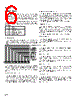
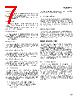
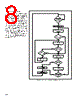
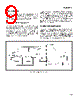


I. Overview & Modes of Operation
️· Purpose: The MA3690/1/3 is a Bus Controller designed to manage communication between a subsystem (likely a computer or microcontroller) and a remote terminal. It handles instruction fetching, message execution, and reporting status.
️· Modes:
- Single-Shot: The subsystem directly controls each message, initiating execution and waiting for completion. Good for simple, controlled communication.
- Table-Driven (Continuous): The subsystem initiates the message table execution, and the controller runs through the table autonomously. Allows for more automated operation and reduced subsystem intervention. This relies on continuous signaling via the HALTREQN line.
️· HALTREQN/HALTEDN: These lines are critical for controlling the controller. HALTREQN initiates/continues execution; HALTEDN indicates the controller is active/busy.
II. Key Functions & Memory Locations
️· Instruction Fetch: The controller retrieves instructions (messages) from memory.
️· Message Execute: The controller manages the transmission and reception of data, status words, etc., based on the instructions.
️· Reporting: After a message cycle, the controller reports status via the `RECEIVE STATUS WORD`, `TRANSMIT STATUS WORD`, and various flag bits (see detailed status descriptions below).
III. Status Word Locations & Flags
This is the most detailed section – here’s a breakdown of the flags and their meanings:
️· RECEIVE STATUS WORD: Stores the status word received from a transmitting terminal. Updated with the contents of the transmit command word during self-test.
️· TRANSMIT STATUS WORD: Stores the status word received from a receiving terminal. Updated with the contents of the receive command word during self-test.
Detailed Flag Descriptions (Important for Troubleshooting/Understanding):
️· Retry Used: Set if any retries occurred during message execution.
️· Word Count Low/High: Indicate if the number of data words sent/received differed from what was expected.
️· Command Error: Indicates a problem with the instruction itself.
️· TX Status Missing: No response received from a transmitter (when not a broadcast).
️· TX Status Flag: Indicates issues with a received status word (e.g., incorrect terminal address).
️· RX Status Missing: No response from a receiver (not broadcast).
️· RX Status Flag: Issues with a received status word.
️· Transmitter Timeout On Bus 0/1: Indicates a timeout error occurred on the specified bus during self-test.
️· Continuous Bus Traffic: Indicates the bus was already active when the controller was instructed to transmit. A runaway terminal is often the cause.
️· Programmed Halt: Set when the "Interrupt Always" flag is active.
️· Loop Test Failure: Indicates an absence of terminal transmission or waveform encoding error.
️· Subsystem Handshake Failure: Indicates a failure by the subsystem to acknowledge a data transfer request within a specific timeframe.
️· INCADRN (Increment Address Counter): Signal to increment the address of the next instruction. Used in table-driven operation.
️· HALTREQN/HALTEDN: Control signals for starting and managing message execution.
IV. Important Considerations
️· Glitch-Free HALTREQN: Critical for reliable operation in single-shot mode. Signal noise can lead to unintended command execution.
️· Intermessage Gap: In continuous table-driven operation, there's a 20us gap between messages.
️· Continuous Bus Traffic (Runaway Terminal): A significant flag to watch for, signaling a terminal transmitting uncontrolled data.
How to Use This Information
️· Troubleshooting: Use the flag descriptions to diagnose problems with communication.
️· System Design: Consider the pros and cons of single-shot versus table-driven operation for your application.
️· Understanding Status: The status flags provide a comprehensive view of the message execution process.
I. Overview & Modes of Operation
️· Purpose: The MA3690/1/3 is a Bus Controller designed to manage communication between a subsystem (likely a computer or microcontroller) and a remote terminal. It handles instruction fetching, message execution, and reporting status.
️· Modes:
- Single-Shot: The subsystem directly controls each message, initiating execution and waiting for completion. Good for simple, controlled communication.
- Table-Driven (Continuous): The subsystem initiates the message table execution, and the controller runs through the table autonomously. Allows for more automated operation and reduced subsystem intervention. This relies on continuous signaling via the HALTREQN line.
️· HALTREQN/HALTEDN: These lines are critical for controlling the controller. HALTREQN initiates/continues execution; HALTEDN indicates the controller is active/busy.
II. Key Functions & Memory Locations
️· Instruction Fetch: The controller retrieves instructions (messages) from memory.
️· Message Execute: The controller manages the transmission and reception of data, status words, etc., based on the instructions.
️· Reporting: After a message cycle, the controller reports status via the `RECEIVE STATUS WORD`, `TRANSMIT STATUS WORD`, and various flag bits (see detailed status descriptions below).
III. Status Word Locations & Flags
This is the most detailed section – here’s a breakdown of the flags and their meanings:
️· RECEIVE STATUS WORD: Stores the status word received from a transmitting terminal. Updated with the contents of the transmit command word during self-test.
️· TRANSMIT STATUS WORD: Stores the status word received from a receiving terminal. Updated with the contents of the receive command word during self-test.
Detailed Flag Descriptions (Important for Troubleshooting/Understanding):
️· Retry Used: Set if any retries occurred during message execution.
️· Word Count Low/High: Indicate if the number of data words sent/received differed from what was expected.
️· Command Error: Indicates a problem with the instruction itself.
️· TX Status Missing: No response received from a transmitter (when not a broadcast).
️· TX Status Flag: Indicates issues with a received status word (e.g., incorrect terminal address).
️· RX Status Missing: No response from a receiver (not broadcast).
️· RX Status Flag: Issues with a received status word.
️· Transmitter Timeout On Bus 0/1: Indicates a timeout error occurred on the specified bus during self-test.
️· Continuous Bus Traffic: Indicates the bus was already active when the controller was instructed to transmit. A runaway terminal is often the cause.
️· Programmed Halt: Set when the "Interrupt Always" flag is active.
️· Loop Test Failure: Indicates an absence of terminal transmission or waveform encoding error.
️· Subsystem Handshake Failure: Indicates a failure by the subsystem to acknowledge a data transfer request within a specific timeframe.
️· INCADRN (Increment Address Counter): Signal to increment the address of the next instruction. Used in table-driven operation.
️· HALTREQN/HALTEDN: Control signals for starting and managing message execution.
IV. Important Considerations
️· Glitch-Free HALTREQN: Critical for reliable operation in single-shot mode. Signal noise can lead to unintended command execution.
️· Intermessage Gap: In continuous table-driven operation, there's a 20us gap between messages.
️· Continuous Bus Traffic (Runaway Terminal): A significant flag to watch for, signaling a terminal transmitting uncontrolled data.
How to Use This Information
️· Troubleshooting: Use the flag descriptions to diagnose problems with communication.
️· System Design: Consider the pros and cons of single-shot versus table-driven operation for your application.
️· Understanding Status: The status flags provide a comprehensive view of the message execution process.
| Part No. | MAS3691NL |
| Manufacturer | DYNEX |
| Size | 426 Kbytes |
| Pages | 41 pages |
| Description | 1553B Bus Controller/Remote Terminal |
| ¿ALLDATASHEET es útil para Ud.? [ DONATE ] |
Todo acerca de Alldatasheet | Publicidad | Contáctenos | Política de Privacidad | Enlace a la hoja de datos | Intercambio de Enlaces | Lista de Fabricantes All Rights Reserved©Alldatasheet.com |
| Russian : Alldatasheetru.com | Korean : Alldatasheet.co.kr | Spanish : Alldatasheet.es | French : Alldatasheet.fr | Italian : Alldatasheetit.com Portuguese : Alldatasheetpt.com | Polish : Alldatasheet.pl | Vietnamese : Alldatasheet.vn Indian : Alldatasheet.in | Mexican : Alldatasheet.com.mx | British : Alldatasheet.co.uk | New Zealand : Alldatasheet.co.nz |
|
Family Site : ic2ic.com |
icmetro.com |
 Mexican ▼
  English
 Chinese
 German
 Japanese
 Russian
 Korean
 Spanish
 French
 Italian
 Portuguese
 Polish
 Vietnamese
 Indian
 British
 New Zealand